
Voice Chat: Difference between revisions
Created page with "<div class="prompt-guide"> = Crushon Voice Chat = With the Voice Chat feature, you can assign unique voice tones to characters, letting them “speak” and creating a more immersive chat experience. <div class="steps"> '''1. Feature Overview''' With the voice feature, you can assign unique voice tones to characters, letting them “speak” and enhancing immersion in your conversations. '''2. How to Enable Voice''' * '''Enter a Chat:''' Select any character a..." |
No edit summary |
||
| Line 12: | Line 12: | ||
* '''Enter a Chat:''' Select any character and open the chat window. | * '''Enter a Chat:''' Select any character and open the chat window. | ||
* '''Set Up Voice:''' Tap the Voice button in the chat input. | * '''Set Up Voice:''' Tap the Voice button in the chat input.[[File:Image44444.jpg|none|thumb|773x773px]] | ||
* '''Choose a Tone:''' Pick from a variety of available voices. Some premium tones are exclusive to Luxe and higher-tier members. | * '''Choose a Tone:''' Pick from a variety of available voices. Some premium tones are exclusive to Luxe and higher-tier members.[[File:Image (441).jpg|none|thumb|588x588px]] | ||
* '''Play Voice:''' Tap the Voice button below a message to listen. | * '''Play Voice:''' Tap the Voice button below a message to listen. | ||
[[File:Image (4474).png|none|thumb|803x803px]] | |||
'''3. Notes''' | '''3. Notes''' | ||
* The voice feature consumes Message Credits, and the credit cost varies depending on the selected voice. Please review the pricing details after choosing a tone. | * The voice feature consumes Message Credits, and the credit cost varies depending on the selected voice. Please review the pricing details after choosing a tone. | ||
* Voice playback may be delayed if your network connection is unstable. | [[File:Image (4484).png|none|thumb|808x808px]] | ||
* Ensure your device’s volume is on. On iOS devices, make sure the mute switch is turned off. | * Voice playback may be delayed if your network connection is unstable. | ||
* Ensure your device’s volume is on. On iOS devices, make sure the mute switch is turned off. | |||
</div> | </div> | ||
Latest revision as of 04:41, 18 September 2025
Crushon Voice Chat
With the Voice Chat feature, you can assign unique voice tones to characters, letting them “speak” and creating a more immersive chat experience.
1. Feature Overview With the voice feature, you can assign unique voice tones to characters, letting them “speak” and enhancing immersion in your conversations.
2. How to Enable Voice
- Enter a Chat: Select any character and open the chat window.
- Set Up Voice: Tap the Voice button in the chat input.

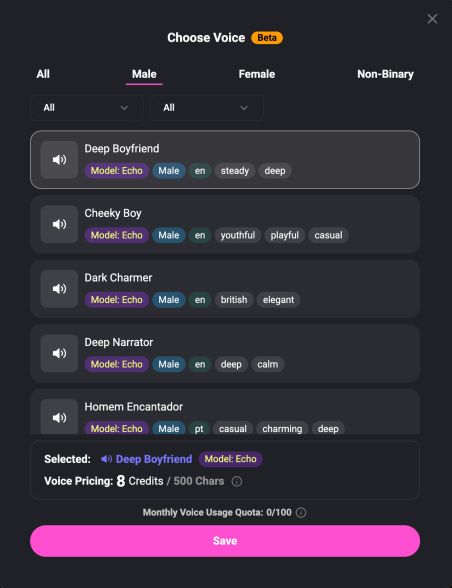
- Choose a Tone: Pick from a variety of available voices. Some premium tones are exclusive to Luxe and higher-tier members.
- Play Voice: Tap the Voice button below a message to listen.

.jpg)
.png)
3. Notes
- The voice feature consumes Message Credits, and the credit cost varies depending on the selected voice. Please review the pricing details after choosing a tone.
.png)
- Voice playback may be delayed if your network connection is unstable.
- Ensure your device’s volume is on. On iOS devices, make sure the mute switch is turned off.
Next → Crushon Model Creation