
Apk/APP
CrushOn AI Download / Installation / APK
Explore the latest CrushOn AI download options, including the CrushOn AI APK, and enjoy seamless intelligent interactions anytime, anywhere!
We are excited to announce that you can download our app for easy access to our services!
Installation Options
You can install CrushOn AI in three main ways:
1. Install the Web Version
Add the CrushOn AI website to your device’s home screen.
- iOS: Follow the steps shown in the screenshot to add the webpage to your desktop.
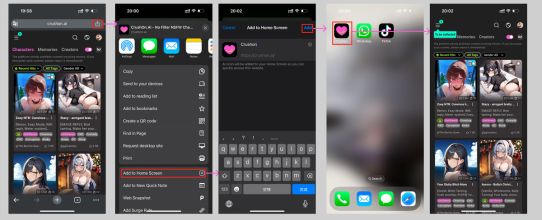
- Android: Open Google Chrome, visit the site, and follow the screenshot guide.
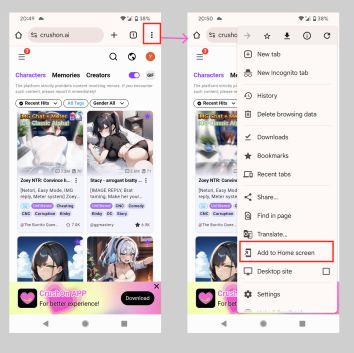
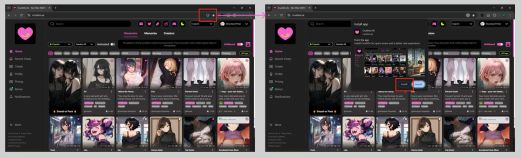
- PC: Open Google Chrome, visit the site, and follow the screenshot guide.
.jpg)
.jpg)
.jpg)
2. Download the APK (Android)
If you are using an Android phone, you can download the APK for manual installation: ⬇️ Download APK
3. Install via AltStore (iOS)
For iOS devices, you can install the app using AltStore.
Step 1: Install AltStore
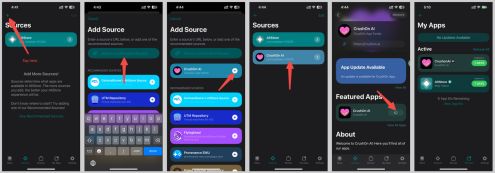
Step 2: Add Source
- Open the AltStore app on your device
- Tap Sources in the bottom navigation bar
- Tap the + button in the top-left corner
- Enter: altstore.crushon.ai/config.json
- Wait until the CrushOn source loads, then tap it to view and install CrushOn AI
.jpg)
Common Issues
- Ensure AltServer is started and running on your computer
- AltServer must be on the same WiFi network as your device (or connected via USB cable)
- If you have the AppStore version of CrushOn AI installed, delete it before installing via AltStore
- If AltStore expires, refresh it by re-installing through AltServer (no need to delete AltStore)
- For other issues, see the Troubleshooting Guide
Tip: Keep AltServer running whenever you refresh or install the app.